

Before you begin
XBO Partners is a marketing management platform that helps to manage campaign’s marketing effort including Leads distribution, tracking and Affiliate integrations. This guide will help Affiliates to set up their connection through the Public APIs of the XBO Partners system to send Leads and monitor updates.
Each Affiliate is communicated by their related Manager of the XBO Partners system and receives the Affiliate account name, credentials to login into the XBO Partners system, unique API Token to connect to XBO Partners API.
Authentication
XBO Partners system can receive Leads through the Public API connection that implies REST/JSON web service, accessible over HTTPS. The API schema is in Swagger format (also known as the OpenAPI specification format), so developers integrating with the XBO Partners Public API can benefit from the many supporting tools, documentation, and resources available within the Swagger/OpenAPI ecosystem.
XBO Partners system (further in the document can be referenced as ‘System’) is supported with the API Keys flow that allows the Affiliate to send the API requests through the System Public APIs via the custom header. To make a request, an API Token must be received by the Affiliate from the relevant Manager or other point of contact of the System.
Methods
| Method | Action | Description |
|---|---|---|
| GET | READ | Read a specific item or a collection of items, e.g., one Lead or a collection of Leads |
| POST | CREATE | Create a new item, e.g., sending a Lead |
Response statuses
| Status | Description |
|---|---|
| 200 OK | General success status code |
| 201 Created | Item was created successfully via POST |
| 400 Bad Request | General error when fulfilling the request would cause an invalid state. Domain validation errors, missing data, etc. |
| 401 Unauthorized | Error code response for missing or invalid authentication token |
| 403 Forbidden | Error code for when the user is not authorized to perform the operation, or certain item is unavailable for some reason. |
| 415 Unsupported Media Type | Wrong Accept/Content-Type |
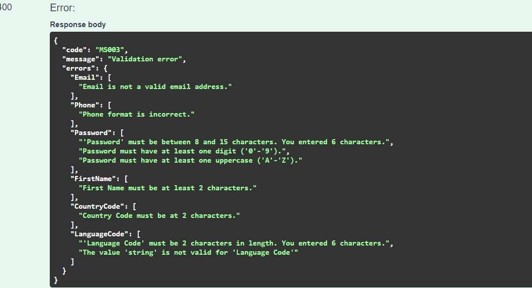
An object that contains an error will be returned when API request fails, e.g., HTTP Status Code: 400
{
   "code":"string",
   "message":"string",
   "errors":{
      "additionalProp1":[
         "string"
      ],
      "additionalProp2":[
         "string"
      ]
   }
}
Sending a Lead through API (also known as ‘sending traffic’ or ‘lead registration’ via API integration)
Request example
Lead can be sent to XBO Partners using POST request according to the example:
URL, method: POST https://integration.partners.xbo.com/api/system/v1/leads
Header: Authorization: ApiToken {unique API Token provided to the Affiliate}
API token example: CfDJ8LaBmQ4zm01GhOoDiflmGMMfLd_uF3HSF9404Rnpel42KwX10G_wxwSXOPaZQeXsuEaoelBV22VDwWLbi_R5GStltBbIIAM83zwyk292mT- lOVO0yNTJIpo7mGjZjZ49I_MY8eWJ4KtbrKrtY85zxVVdbZ56mXDsD60St4UJHNOLVyqsdLMHsBsug78DAUIsQ
{
   "firstName":"Ellen",
   "lastName":"Smith",
   "email":"[email protected]",
   "phone":"+972524123456 ",
   "password":" Qwer!y98",
   "countryCode":"IT",
   "acceptTermsAndConditions":true,
   "acceptPromotions":true,
   "referralUrl":"https://website.com",
   "subCampaign":"search",
   "placement":"facebook",
   "keyword":"bitcoin",
   "sub2":"free_sub_value",
   "clickId":"1c22d66a941ac90d8",
   "deviceType":"Mobile",
   "deviceName":"5033G",
   "osName":"Android",
   "browser":"Chrome Mobile",
   "carrier":"Mobile",
   "languageCode":"EN"
}
Parameters
| Name | Type | Mandatory | Description |
|---|---|---|---|
| firstName | string | Yes | Lead’s first name, e.g., Ellen |
| lastName | string | Yes | Lead’s last name, e.g., Smith |
| string | Yes | Lead’s email address, e.g., [email protected] | |
| phone | string | Yes | Lead’s phone number, e.g., +972524123456. Note: if the country code is not provided, it will be added according to the value sent in the ‘countryCode’ field |
| password | string | Yes | Lead’s password, a special character is required, min number of required characters is eight e.g., Qwer!y98 |
| countryCode | string | Yes | Alpha-2 country code, e.g., IT (stands for Italy) |
| acceptTermsAndConditions | boolean | No | Defaults to false |
| acceptPromotions | boolean | No | Defaults to false |
| referralUrl | string | No | URL of the landing page, e.g., https://landing.com/ ?a_id={affiliate ID in the system} &c_id={ID of the Landing page in the system} &f_id={ID of the related Funnel in the system} &subcampaign=search-crypto &sub2=sub_value &keyword=bitcoin &clickid=1c33d66a941ac90a6 &placement=binance |
| subCampaign | string | No | Identify sources or marketing campaigns. Can be sent in postback |
| placement | string | No | Name of the landing page or ad, e.g., referral. Can be sent in postback |
| keyword | string | No | Keyword name, e.g., bitcoin. Can be sent in postback |
| sub2 | string | No | Extra free sub value, e.g., free_sub_value. Can be sent in postback |
| clickId | string | No | To send in postbacks, e.g., 1c33d66a941ac90a6 |
| deviceType | string | No | Browser information, e.g., Mobile |
| deviceName | string | No | Browser information, e.g., 5033G |
| osName | string | No | Browser information, e.g., Android |
| browser | string | No | Browser information, e.g., Chrome Mobile |
| carrier | string, enum | No | Possible values: Mobile, WiFi |
| languageCode | string | No | Alpha-2 country code, e.g., IT (stands for Italian) |
| ipAddress | string | No | Could be IPv4 or IPv6 |
| comment | string | No | Free text comment |
Response
The 200 OK response for the registered Lead will return:
{
   "leadId": 123456,
   "redirectUrl": "https...",
   "subCampaign":" subCampaign ",
   "placement":" placement ",
   "keyword":" keyword ",
   "sub2":" sub2",
   "clickId":" clickId ",
   "crmId":" crmId "
}
| Name | Type | Description |
|---|---|---|
| leadId | integer | ID of the Lead in the XBO Partners system, e.g., 123456 |
| redirectUrl | string | Link for User redirect to the Brand’s website page |
| subCampaign | string | The value that was sent in registration request |
| placement | string | The value that was sent in registration request |
| keyword | string | The value that was sent in registration request |
| sub2 | string | The value that was sent in registration request |
| clickId | string | The value that was sent in registration request |
| crmId | string | The value that was sent in registration request |
Example with error response – 400 Bad Request:
{
   "code":"MS003",
   "message":"Validation error",
   "errors":{
      "CountryCode":[
         "Country Code must be 2 characters"
      ]
   }
}
Occasional flow for Lead registration
XBO Partners can receive a request that when it is passed to XBO, the relevant Customer is created with the Occasional verification level. In this scenario, the registered individual can login to the XBO Platform take advantage of the functionality available for Occasional verification level according to regulation settings [configured on XBO level].
To enable the flow described above, the Lead registration request must be sent over XBO Partners API like for the regular flow, mentioned in previous paragraphs, with the following inputs as mandatory data:
- firstName
- lastName
- phone
- password
- countryCode
- acceptTermsAndConditions
- isEmailVerified
- isPhoneVerified
- dateOfBirth
Request example
Lead can be sent to XBO Partners using POST request according to the example:
URL, method: POST https://integration.partners.xbo.com/api/system/v1/leads
Header: Authorization: ApiToken {unique API Token provided to the Affiliate}
API token example: CfDJ8LaBmQ4zm01GhOoDiflmGMMfLd_uF3HSF9404Rnpel42KwX10G_wxwSXOPaZQeXsuEaoelBV22VDwWLbi_R5GStltBbIIAM83zwyk292mT- lOVO0yNTJIpo7mGjZjZ49I_MY8eWJ4KtbrKrtY85zxVVdbZ56mXDsD60St4UJHNOLVyqsdLMHsBsug78DAUIsQ
{
   "firstName":"Ellen",
   "lastName":"Smith",
   "email":"[email protected]",
   "phone":"+972524123456 ",
   "password":" Qwer!y98",
   "countryCode":"IT",
   "acceptTermsAndConditions":true,
   "isEmailVerified":true,
   "isPhoneVerified":true,
   "dateOfBirth":"2000-01-15T01:00:00.000Z",
   "acceptPromotions":true,
   "referralUrl":"https://website.com",
   "subCampaign":"search",
   "placement":"facebook",
   "keyword":"bitcoin",
   "sub2":"free_sub_value",
   "clickId":"1c22d66a941ac90d8",
   "deviceType":"Mobile",
   "deviceName":"5033G",
   "osName":"Android",
   "browser":"Chrome Mobile",
   "carrier":"Mobile",
   "languageCode":"EN"
}
Parameters
| Name | Type | Mandatory for Occasional Flow | Description |
|---|---|---|---|
| firstName | string | Yes | Lead’s first name, e.g., Ellen |
| lastName | string | Yes | Lead’s last name, e.g., Smith |
| string | Yes | Lead’s email address, e.g., [email protected] | |
| phone | string | Yes | Lead’s phone number, e.g., +972524123456. Note: if the country code is not provided, it will be added according to the value sent in the ‘countryCode’ field |
| password | string | Yes | Lead’s password, a special character is required, min number of required characters is eight e.g., Qwer!y98 |
| countryCode | string | Yes | Alpha-2 country code, e.g., IT (stands for Italy) |
| acceptTermsAndConditions | boolean | Yes | Defaults to false |
| languageCode | string | Yes | Alpha-2 country code, e.g., IT (stands for Italian) |
| isEmailVerified | boolean | Yes | Required to be sent as ‘true’ for Occasional flow |
| isEmailVerified | boolean | Yes | Required to be sent as ‘true’ for Occasional flow |
| dateOfBirth | date-time | Yes | Ex.: “2000-01-15T01:00:00.000Z”, also only date is allowed: “2007-01-15" Note: do NOT send time details if the lead has just turned 18 on the day of registration |
| acceptPromotions | boolean | No | Defaults to false |
| referralUrl | string | No | URL of the landing page, e.g: https://landing.com/ ?a_id={affiliate ID in the system} &c_id={ID of the Landing page in the system} &f_id={ID of the related Funnel in the system} &subcampaign=search-crypto &sub2=sub_value &keyword=bitcoin &clickid=1c33d66a941ac90a6 &placement=binance |
| subCampaign | string | No | Identify sources or marketing campaigns. Can be sent in postback |
| placement | string | No | Name of the landing page or ad, e.g., referral. Can be sent in postback |
| keyword | string | No | Keyword name, e.g., bitcoin. Can be sent in postback |
| sub2 | string | No | Extra free sub value, e.g., free_sub_value. Can be sent in postback |
| clickId | string | No | To send in postbacks, e.g., 1c33d66a941ac90a6 |
| deviceType | string | No | Browser information, e.g., Mobile |
| deviceName | string | No | Browser information, e.g., 5033G |
| osName | string | No | Browser information, e.g., Android |
| browser | string | No | Browser information, e.g., Chrome Mobile |
| carrier | string, enum | No | Possible values: Mobile, WiFi |
| ipAddress | string | No | Could be IPv4 or IPv6 |
| comment | string | No | Free text comment |
Monitoring data
How to retrieve the data
Get API token from your Affiliate Manager and retrieve Leads’ details from the XBO Partners system using GET request by specifying query parameters with pagination according to the example:
URL, method: GET https://integration.partners.xbo.com/api/system/v1/leads/search?
Header: Authorization: ApiToken {unique API Token provided to the Affiliate}
API token example: CfDJ8LaBmQ4zm01GhOoDiflmGMMfLd_uF3HSF9404Rnpel42KwX10G_wxwSXOPaZQeXsuEaoelBV22VDwWLbi_R5GStltBbIIAM83zwyk292mT-lOVO0yNTJIpo7mGjZjZ49I_MY8eWJ4KtbrKrtY85zxVVdbZ56mXDsD60St4UJHNOLVyqsdLMHsBsug78DAUIsQ
| Name | Type | Description |
|---|---|---|
| orderBy | string | Ability to sort ascendingly the returned Leads by: ModifiedOn, CreatedOn, FtdFate, Id – please make sure that the first letter in the name of the parameter is big; For now there is no ability to sort desc; |
| id | integer | Ability to get Lead details by lead Id in XBO Partners |
| count | integer | Paging parameter - number of Leads to fetch; defaults to 10; !max number of records per request is 1000! |
| skip | integer | Paging parameter - number of Leads to skip from the beginning of list or from the previous group of fetched records; defaults to 0 |
| modifiedOnFrom | string (date-time) | Start date of the date range to filter by update date and time (in UTC) |
| modifiedOnTo | string (date-time) | End date of the date range to filter by update date and time (in UTC) |
| createdOnFrom | string (date-time) | Start date of the date range to filter by creation date and time (in UTC) |
| createdOnTo | string (date-time) | End date of the date range to filter by creation date and time (in UTC) |
| ftdDateTo | string (date-time) | Start date of the date range to filter by FTD date and time (in UTC) |
| ftdDateFrom | string (date-time) | End date of the date range to filter by FTD date and time (in UTC) |
Midnight time UTC is considered by the system if the time is not provided in the request alongside the date in filter.
Response model
| Name | Type | Description |
|---|---|---|
| id | integer | ID of the Lead within XBO Partners |
| string | Lead email, that value is sent over registration request | |
| status | string | Lead status |
| crmId | string | ID of the Lead in Brand CRM that accepted the Lead. Visibility is controlled per Affiliate via Admin UI. |
| brandId | integer | ID of the Brand in XBO Partners; brand which accepted the Lead. Visibility is controlled per Affiliate via Admin UI. |
| brandName | string | Name of the Brand in XBO Partners; brand which accepted the Lead |
| createdOn | string (date-time) | Date when the Lead was updated in UTC, ex. 2022-12-19T11:01:58.302Z |
| updatedOn | string (date-time) | Date when the Lead was updated in UTC, ex. 2022-12-19T11:01:58.302Z |
| ftdDate | string (date-time) | Returns FTD date if such was made. Visibility is controlled per Affiliate via Admin UI. |
| clickId | string | The value that was sent in registration request |
| sub2 | string | The value that was sent in registration request |
| subCampaign | string | The value that was sent in registration request |
| keyword | string | The value that was sent in registration request |
| placement | string | The value that was sent in registration request |
| clientType | string | Can be Client (when FTD was made) or Depositor (when FTD was not made) |
{
   "items":[
      {
         "id":12355,
         "email":"[email protected]",
         "status":"New",
         "crmId":"ACC111111",
         "brandId":1,
         "brandName":"Brand name",
         "createdOn":"2021-08-08T17:29:37.455Z",
         "updatedOn":"2021-08-08T17:29:37.455Z",
         "ftdDate":"2021-08-08T17:29:37.455Z",
         "clickId":"jsi8eisjos909s",
         "sub2":"value"
      }
   ],
   "count":1
}
For example, if the data needs to be retrieved for the Leads records that were created on the 8th of August, then the request for 1-day range should be: 2021-08-08T00:00:00 to 2021-08-08T23:59:59 (or 2021-08-08 to 2021-08-09).
If there is a need to get Leads filtered by certain time range within one day, specify the time accordingly, for example:
curl --location --request POST 'https://integration.partners.xbo.com/api/system/v1/leads' \
--header 'Authorization: ApiToken
CfDJ8LaBmQ4zm01GhOoDiflmGMMfLd_uF3HSF9404Rnpel42KwX10G_wxwSXOPaZQeXsuEaoelBV22VDwWLbi_R5GStltBbIIAM83zwyk292mTlOVO0yNTJIpo7mGjZjZ49I_MY8eWJ4KtbrKrtY85zxVVdbZ56mXDsD60St4UJHNOLVyqsdLMHsBsug78DAUIsQ ' \
--header 'Content-Type: application/json' \
--data-raw '{"firstName":"Test","lastName":"Test","email":"[email protected]","phone":"+37011111111129","countryCode":"HU","referralUrl":"string.com","subca
mpaign":"test subcampaign","keyword":"keywordValue","clickId":"clickIdValue","ipAddress":"1.1.1.1","languageCode":"EN","p
reventWelcomeEmail":"true","password":" Qwer!y98"}'
the response will include all Leads created during that period
The same works for requests:
- to retrieve Leads records that were created for certain period:
curl --location --request GET
'https://integration.partners.xbo.com/api/system/v1/leads/search?createdOnFrom=2021-08-
08T15:00:00&createdOnTo=2021-09-08T23:59:59 ' \
--header 'Authorization: ApiToken
CfDJ8LaBmQ4zm01GhOoDiflmGMMfLd_uF3HSF9404Rnpel42KwX10G_wxwSXOPaZQeXsuEaoelBV22VDwWLbi_R5GStltBbIIAM83zwyk292mTlOVO0yNTJIpo7mGjZjZ49I_MY8eWJ4KtbrKrtY85zxVVdbZ56mXDsD60St4UJHNOLVyqsdLMHsBsug78D
AUIsQ'
- to retrieve Leads records that were changed within a single day: https://integration.partners.xbo.com/api/system/v1/leads/search?updatedOnFrom=2021-0808T00:00:00&updatedOnTo=2021-08-08T23:59:59
- to retrieve Leads records that were changed for certain period: https://integration.partners.xbo.com/api/system/v1/leads/search?updatedOnFrom=2021-0808T00:00:00&updatedOnTo=2021-08-09T23:59:59
- to retrieve Leads records that were converted within a single day: https://integration.partners.xbo.com/api/system/v1/leads/search?ftdDateFrom=2021-0808T00:00:00&ftdDateTo=2021-08-08T23:59:59
- to retrieve Leads records that were converted during certain period: https://integration.partners.xbo.com/api/system/v1/leads/search?ftdDateFrom=2021-0808T00:00:00&ftdDateTo=2021-08-18T23:59:59
Paging parameters application: if paging parameters are not provided, then the service with return only 10 records. In order to get more the ‘count’ parameter must be specified:
curl --location --request GET '
https://integration.partners.xbo.com/api/system/v1/leads/search?createdOnFrom=2021-08-
08T15:00:00&createdOnTo=2021-09-08T23:59:59&count=1000 ' \
--header 'Authorization: ApiToken
CfDJ8LaBmQ4zm01GhOoDiflmGMMfLd_uF3HSF9404Rnpel42KwX10G_wxwSXOPaZQeXsuEaoelBV22VDwWLbi_R5GStltBbIIAM83zwyk292mTlOVO0yNTJIpo7mGjZjZ49I_MY8eWJ4KtbrKrtY85zxVVdbZ56mXDsD60St4UJHNOLVyqsdLMHsBsug78D
AUIsQ'
if there are more than 1000 records to fetch, the ‘skip’ paging parameter must be specified accordingly, for example, if there are 1001 records, then two requests must be sent:
first request: https://integration.partners.xbo.com/api/system/v1/leads/search?createdOnFrom=2021-08-08T15:00:00&createdOnTo=2021-09-08T23:59:59&count=1000&skip=0
second request: https://integration.partners.xbo.com/api/system/v1/leads/search?createdOnFrom=2021-08-08T15:00:00&createdOnTo=2021-09-08T23:59:59&count=1&skip=1000
Errors

Initial steps to integrate with the XBO Partners system
- Please send a test lead via API, so that it can be checked in XBO Partners that the integration is successful.
- Please use the following template of the lead’s email address: ****@only-test.com
Sending postbacks
When an event occurs, such as Lead registration or Lead conversion, the request with the content will be sent to the specified URL by GET method. Everything sent to the value into the referralUrl property as query params will be sent in the postback from XBO Partners.
It is possible to send the following list of parameters from referralUrl within postback:
- subcampaign
- placement
- keyword
- sub2
- clickid
- payout
- currency
To send values for the above-mentioned parameters from referral URL, they should be mentioned in postback URLs as placeholders in [[double brackets]] or {curly brackets}, the values will be substituted in these placeholders, otherwise, if no placeholders used in postback URL, all of them (I present in Referral URL) will be just copied as is. For example:
The URL is https://landing.com/?a_id=25&c_id=123&f_id=60&subcampaign=searchcrypto&clickid=1c33d66a941ac90a6&placement=binance (with parameter placeholders) deposit postback is like the following:
http://landing.com?event_type=ftd&affiliate=[[subcampaign]]&transaction_id=[[clickid]]
Registration postback is like the following: http://landing.com?event_type=lead (without placeholders)
then:
the registration of Lead will produce this postback request: http://landing.com?subcampaign=searchcrypto&clickid=1c33d66a941ac90a6&placement=binance
Referral LP example: https://lp.xbo.com/referral?a_id=952&c_id=2&f_id=2
The deposit event will produce another request: http://landing.com?event_type=ftd&affiliate=search-crypto